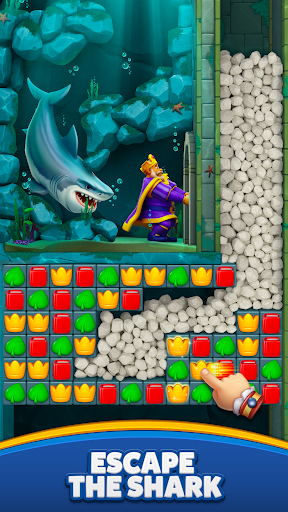
Royal Match succeeds by keeping the core loop simple: solve match-3 boards, earn coins and boosters, unlock castle areas, and return for named events such as King's Cup, Sky Race, Team Battle, and Lightning Rush. Google Play currently lists it as ad-free, playable offline, and packed with content on a roughly two-week level cadence. The tradeoffs are harder to miss: difficult levels can encourage booster or coin purchases, unlinked progress can be lost after a device change, and linking Facebook, Google, or Apple improves recovery while adding account and social visibility considerations.
Our verdictAn unusually polished, ad-free match-3 choice for players who can tolerate occasional difficulty walls, but account backup and spending supervision are essential. It is friendlier than many ad-supported puzzle games, yet its $99.99 item ceiling and privacy-account linking still require deliberate setup.
What Dream Games and Google Play say about progress, spending, and data
The findings below cross-check Royal Match's Android listing and update notes with Dream Games' support and privacy documents. They focus on decisions that affect account recovery, household spending, and privacy rather than repeating the store's screenshots.For another match-three restoration loop, read our Royal Kingdom review.For visual matching with collection-bar pressure, see our Match Factory! review.
New content arrives on a stated two-week cadence
Google Play's update notes for the current Royal Match snapshot describe 100 new levels, a new Lagoon area, Duke's Treats, weekly missions, and the statement that new levels come every two weeks. That cadence is meaningful for long-term players: delayed updates can stall content, while each update can also change event timing and total installed content.
Source The puzzle loop extends beyond level solving into named competitions
The official Android listing identifies thousands of match-3 levels, coins for unlocking areas, castle decoration, boosters, and events including King's Cup, Sky Race, Team Battle, and Lightning Rush. Team Battle in particular adds a coordination layer that ordinary offline match-3 apps do not always provide.
Source No-ad play coexists with a wide in-app purchase range
Google Play describes Royal Match as free and without ads in its standard package, while also offering in-app items priced from $0.99 to $99.99. That removes interstitial-ad fatigue but concentrates monetization in boosters, coins, lives, bundles, or other purchases, especially when a difficult board repeatedly blocks progress.
Source Official recovery depends on Facebook, Google, or Apple sign-in
Dream Games' support center says signing in with Facebook or Google ensures Royal Match progress is saved and lets players continue on another device. It warns that switching to a different Facebook or Google account can reset progress, and that data cannot be restored after a factory reset if progress was not backed up through iCloud, iTunes, Google, or Facebook. A related article adds Apple sign-in as a transfer option.
Source Account linking also changes what data and friends may become visible
Dream Games explains that Facebook, Google, and Apple authentication can share information such as name, email address, third-party user ID, profile photo, and, for Facebook, friends already playing. It also says players who skip account linking are associated with a randomly generated user ID, though device-level identifiers and other data remain associated with those identifiers.
Source Parental controls and the Everyone rating answer different questions
Google Play rates Royal Match Everyone with Mild Fantasy Violence, making it far more broadly suitable than a violent shooter by content rating. Dream Games separately says children 12 and under are not intended users, players under 18 need guardian permission where applicable, and parental controls can disable chat, in-app payments, and certain other features behind a preset password. Families need both facts: content can be mild while payments and communication still need controls.
Source Android safety declarations still name advertising identifiers and location
Google Play's data-safety listing says device IDs and approximate location may be shared for advertising or marketing, while collection categories include purchase history, app interactions, user IDs, diagnostics, crash logs, and optional name. It also says data deletion can be requested. Dream Games' policy adds targeted-advertising opt-outs under Settings > Terms & Privacy and an in-app account deletion path that permanently removes progress and unspent virtual items.
Source A level every two weeks changes how setbacks feel
Royal Match is not a finished board set; Google Play's notes promise 100 more levels, the Lagoon area, Duke's Treats, weekly missions, and new levels every two weeks. That cadence gives patient players a reason to save boosters and return after updates, but it also normalizes daily return loops. If the app starts controlling sleep, money, or mood, the event schedule is the first mechanism to limit—not just individual levels.
Difficulty walls, not ads, are the purchase pressure point
- Google Play marks Royal Match as free of ads, so the standard Android listing does not insert an advertisement between attempts.
- The store still offers items up to $99.99, so monetization arrives through coins, boosters, lives, power-ups, and bundles rather than advertising interruptions.
- Repeated failed attempts can make a small purchase look like the only escape; treating that impulse as a 24-hour decision is often enough to reveal whether the board is genuinely enjoyable.
- Players who enjoy competition should set an event budget before King's Cup, Sky Race, Team Battle, or Lightning Rush rewards become a reason to spend.
Back up progress before the device changes, not after it disappears
- Choose one recovery identity—Google on Android, or Facebook/Apple where you actually use them—and connect it from Royal Match settings.
- Confirm the same account appears on the profile or account screen before uninstalling, factory resetting, or moving to a new phone.
- Avoid casually switching Facebook or Google accounts: Dream Games warns that using a different account can reset progress.
- For Apple devices, iCloud or iTunes backup can provide another path, but Dream Games says factory-reset data cannot be restored without one of the supported backups.
- Write down the account used for Royal Match and store it with other important game recovery details.
The friendly rating does not make the payment screen childproof
Mild fantasy violence and a colorful king make Royal Match appropriate for a wider content audience than many mobile games, but Dream Games still directs guardians to activate parental controls for chat, in-app payments, and certain features. Those controls require a pre-set password and are separate from Google Play's purchase authentication. A family should therefore set both layers before a child reaches a hard level, where the fastest apparent solution may be a paid booster.
Account links trade convenience for social and identity exposure
Facebook or Google sign-in solves the app's most painful failure mode: losing a long save during a phone change. The cost is contextual. Dream Games says authentication services can provide name, email, third-party user ID, profile photo, and Facebook friends already playing; players can see friends' progress and vice versa in the relevant features. A privacy-first adult may prefer a random ID if they can accept local-loss risk, while a child or heavy player should prioritize recovery and then tighten Facebook app permissions and social visibility.
What the Android package asks for and reports
- Permissions
- Google Play lists network and Wi-Fi connection access, vibration, prevention of sleep, and Google Play license check—an unusually restrained set compared with many ad-supported mobile games.
- Shared data
- The Play data-safety listing names device IDs and approximate location as shared for advertising or marketing.
- Collected data
- It names purchase history, app interactions, user IDs, diagnostics, crash logs, optional name, and other categories, with deletion request support.
Use Dream's exact paths for ads and deletion
- Open Settings > Terms & Privacy to opt out of targeted advertising where available, then reset the device advertising identifier from Android privacy settings if you want a new advertising identity.
- Remember that Dream says opting out stops personal-data sharing for targeted advertising; it does not promise the app will contain no ads in every version or future test.
- Use Settings > Terms & Privacy > Delete Account only after confirming the linked account and accepting that current progress and unused virtual goods cannot be recovered.
- For unresolved account, purchase, or privacy issues, use Royal Match's in-app support or contact@dreamgames.com rather than reinstalling first and destroying local evidence.